“and first for something complete different”: Muzaq… coding or administrating system can’t do without gooood muzaq. Check our latest tunes here :-)
In our Linux Debian section the following articles have been published during the last weeks:
- How to secure your Debian server by changing the SSH port number (read tutorial here [1])
- How to secure your Debian server by setting up SSH for passwordless login via public- and private-key cryptography (read tutorial here [2])
- How to secure your Debian server by updating the buggy openSSH Debian package (read tutorial here [3])
- How to simplify Debian administration by setting up a graphical interface (GNOME) to be used via VNC connection thru an SSH tunnel (read tutorial here [4])
I. Abstract
In this (very short) howto, we’re gonna setup a firewall with a graphical user interface (GUI) for GNOME. This firewall is called Firestarter [5]. Our goal is to further improve safety of our server. We’re gonna do that on a Debian Etch system.
II. Requirements
Hic at nunc, we need to have a running VNC connection (read tutorial here [4]) to our Debian server, because dumbed down: Firestarter is a nice (GNOME) GUI for Nefilter/IPTables (further details here [6]).
III. Installation
Hic et nunc, we follow Kant’s question “What shall I do?”. We assume you logged into your server as root using VNC and opened a terminal. Do the following:
server$ apt-get install firestarter
(installs the firewall)server$ firestarter
(starts firestarter for first configuration)
IV. Configuration
Firestarter auto recognizes your network card and device id (for example eth0 or venet0). Follow the wizard and click Save and Exit then (here because of german screen shots: Speichern und Beenden).
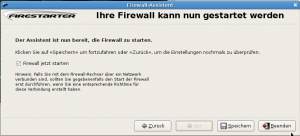
Then the main Firestarter window will open. Since we want to come back later on after having logged out of our server, we have to open at least one port for our VNC through SSH tunnel. Go to register Rules (here because of german screen shots: Richtlinie)
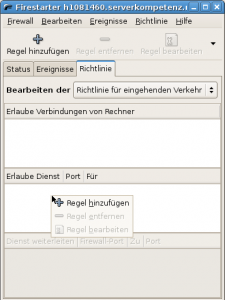
And add a rule (here because of german screenshots: Regel hinzufügen) for your specific ports.
V. Which ports
The following list is only an example you know best which services your server runs.
- the normal VNC port will be 5901 or 5900 – since VNC communication is not encrypted on that port, we strongly recommend to only use a SSH tunnel for VNC sessions.
- in case you followed our recommendation to use an SSH tunneled VNC connection [4] you only need to open port 22, port 5901 or 5900 is not necessary
- in case you followed even our recommendations to change your SSH port number [1] to somewhat different, open that port instead (you may have a look at your
/etc/ssh/sshd_configif you forgot the port number) - if you’re running an apache with a website, you probably need port 80, aswell
VI. Activate new rules
- click on
Apply Rulerule (here because of german screenshots:Richtlinie anwenden)
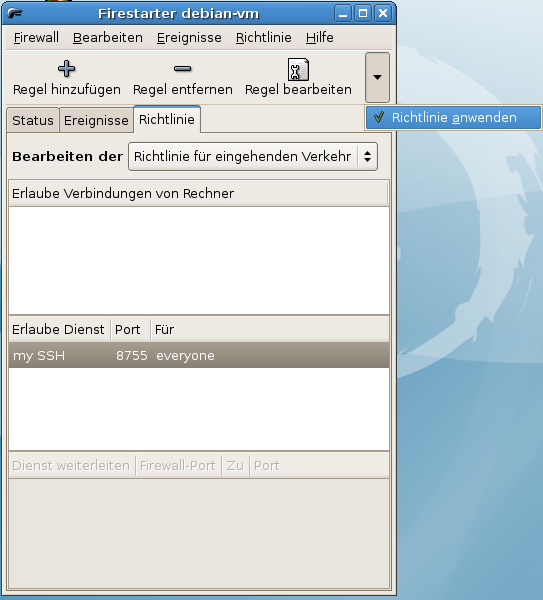 [7]
[7]
VII. Testing
Stay logged and open a second terminal and try to log in, if everything works you’re done. Thanks for your attention.
If this article helped you, please click our sponsor (Google-Adsense) and help us maintaining this project free. Thanks…